


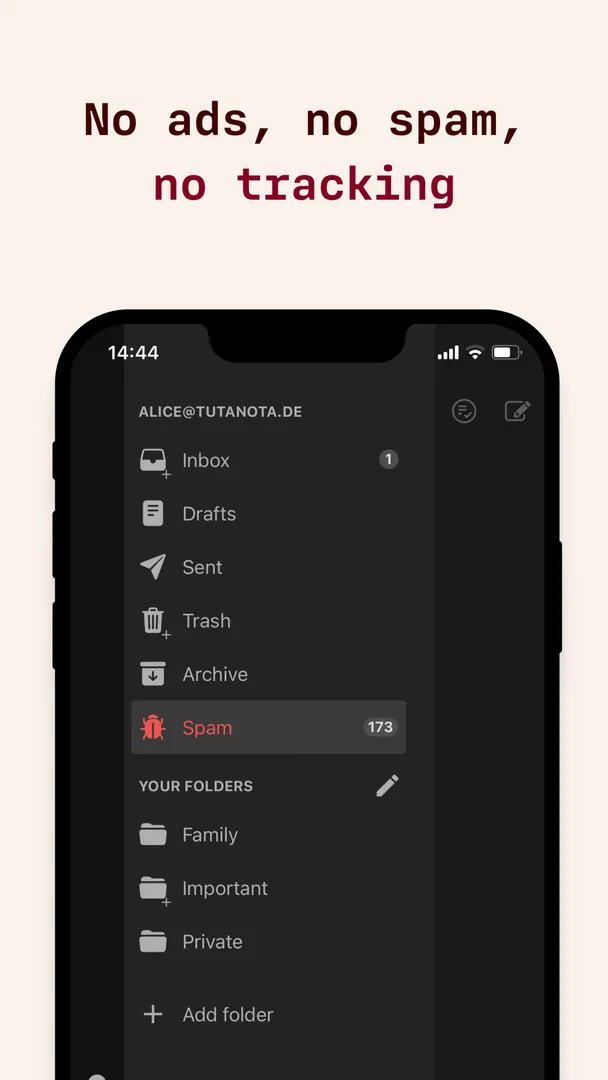


Tuta Mail is an encrypted email app for Android from Tutao GmbH that lets you send end-to-end encrypted messages to anybody and stores your mailbox and contacts encrypted on the provider's servers. The service was previously known as Tutanota, and the app's own description still uses that name throughout.
A free account includes an address ending in @tutanota.com, @tutanota.de, @tutamail.com, @tuta.io or @keemail.me with 1 GB of storage. Tuta Mail offers instant push notifications, auto-sync, full-text search, swipe gestures and a dark theme, and it is developed in Germany under GDPR.
This page explains what the app does, every permission it requests, how to install the APK, what the GPL license and F-Droid build mean, the requirements of version 368.261109.0, and the documented limits you should know about.
What is Tuta Mail?
Tuta Mail is the Android client for Tuta's encrypted email service. The developer's pitch is that you get the benefits of the cloud, such as availability, flexibility and automatic backup, without giving up security. With the built-in encryption, the description says you own your data and no one else can access it.
Tuta Mail handles two kinds of mail. You can send end-to-end encrypted emails to anybody, including people who do not use Tuta. You can also send and receive ordinary emails that are not end-to-end encrypted, and even those are stored encrypted on the Tuta servers, together with your contacts.
Subject lines, message content and attachments are encrypted automatically. A secure password reset is designed so the provider has no access to your data. On the transport side, the service supports TLS with perfect forward secrecy, along with DMARC, DKIM, DNSSEC and DANE.
The developer says the team is funded by its community rather than venture capital, and that Tuta does not track or profile you. The client and apps are open source, and the company is based in Germany, where the description says strict data protection laws under GDPR apply.
Key features of Tuta Mail
- End-to-end encryption to anybody: Send end-to-end encrypted emails to any recipient, not only other Tuta accounts. The description states that only you can access your encrypted emails and contacts.
- Encrypted storage for all mail: Emails sent or received without end-to-end encryption are still stored encrypted on the servers, and your contacts are stored encrypted too.
- Automatic encryption of subject and attachments: The subject line, message content and attachments are encrypted automatically, so you do not need to switch encryption on for each email.
- Free address with 1 GB: Create your own address ending in @tutanota.com, @tutanota.de, @tutamail.com, @tuta.io or @keemail.me, with 1 GB of free storage included.
- Custom domain option: Use your own domain for an email address for €1 per month, according to the description. This suits people or small teams who want a personal domain on an encrypted service.
- Encrypted full-text search: A full-text search feature lets you search your whole mailbox, which the developer calls innovative given that the mailbox itself is encrypted.
- Push notifications and auto-sync: Instant push notifications tell you when new mail arrives, and auto-sync keeps the app in step with your mailbox on other devices.
- Swipe gestures and dark theme: The interface supports swipe gestures for handling messages quickly, and a dark theme is included alongside the default light look.
- Address auto-complete: As you type, the app suggests addresses from your Tuta contacts or from your phone's contacts, so you can pick recipients without copying addresses by hand.
- Modern mail security standards: The service supports TLS with perfect forward secrecy, DMARC, DKIM, DNSSEC and DANE, and offers a secure password reset that gives the provider no access.

Tuta Mail permissions explained
Tuta Mail requests eighteen permissions. Six are marked as sensitive: read contacts, modify contacts, write storage, find accounts, camera and read storage. On modern Android, sensitive permissions like contacts and camera are asked at runtime, so you can decline them. Notifications also need your approval on Android 13 and newer. The description itself explains a few of these, and those explanations are noted below.
- View network connections: Lets the app check whether the device is online and which network type is in use. The description says it is used to find out if an internet connection exists.
- Show notifications: Lets the app show notifications, such as alerts for new mail. On Android 13 and newer, the system asks you first.
- Internet access: Lets the app connect to the internet. The description says full network access is used to send and receive emails.
- Read contacts: Lets the app read your contacts. According to the description, this lets you select recipients from your phone's contacts.
- Modify contacts: Lets the app add or change contacts. The facts do not say which feature uses it.
- Write storage: Lets the app save and modify files in shared storage. The exact feature is not documented.
- Control vibration: Lets the app make the device vibrate. The description says this is used to notify you when a new email arrives.
- Ignore battery optimizations: Lets the app ask to be excluded from battery optimization. The facts do not state the reason.
- Run at startup: Lets the app start itself after the device boots. The feature behind it is not documented.
- Exact alarms: Lets the app schedule alarms at an exact time. The summary mentions a calendar, which may explain it, but the facts do not say so directly.
- Find accounts: Lets the app list accounts on the device. The facts do not describe what it is used for.
- Manage accounts: Lets the app add or remove accounts on the device. The specific use is not documented.
- Use credentials: Lets the app use the "use credentials" system permission. No further detail is given in the facts.
- Change sync settings: Lets the app turn account sync on or off. The facts do not explain which feature needs it.
- Camera: Lets the app take photos and record video. The facts do not say which feature uses the camera.
- Biometrics: Lets the app use fingerprint or face unlock to confirm actions. Which actions is not documented.
- Fingerprint: Lets the app use the fingerprint sensor to confirm actions. The exact use is not documented.
- Read storage: Lets the app read files in shared storage. The description says reading from the SD card allows you to add attachments to emails.
The description says the app asks for very few permissions, but the current build lists more than that older text explains. If this matters to you, decline the sensitive requests you do not need when Android asks.

How to download and install Tuta Mail APK
- Tap the Download button on this page.
- When Android asks, allow installs from your browser.
- Open the downloaded file from the notification or your Downloads folder.
- Tap Install.
- Open the app.
If you have never installed an app outside a store, our guide to installing APK files explains the unknown-sources prompt and common errors. On first launch, sign in to an existing account or create a new address.
This Tuta Mail APK is signed with the F-Droid key. Android generally will not update an app with a file signed by a different key, so if you installed Tuta Mail from another source, uninstall that copy first. Your mail is stored encrypted on the servers and syncs back after you sign in again.

Is Tuta Mail safe?
Tuta Mail is released under GPL-3.0-or-later, a copyleft open-source license. Its source code is public on GitHub, and the issue tracker shows bug reports and discussion in the open. The description also lists the open source client and apps as part of how the service respects your data.
F-Droid builds this APK from the published source code and signs it with the F-Droid key. The file is downloaded from the official f-droid.org repository. You can check the package details on the F-Droid listing.
F-Droid marks Tuta Mail with one anti-feature: NonFreeNet, meaning it relies on a non-free network service. The client is open source, but it connects to Tuta's own mail servers, which the company runs as a hosted service. Those servers are outside what F-Droid builds and checks.
The encryption, no-tracking and password reset statements come from the developer. The facts do not mention independent audits, and ApkSpark does not claim the file has been scanned. What you can verify is the license, the public code and the build source.
Tuta Mail system requirements
- Minimum Android version: Android 8.0 or newer.
- Download size: 78.4 MB.
- Supported ABIs: arm64-v8a, armeabi, armeabi-v7a, mips, mips64, x86 and x86_64.
- Version: 368.261109.0.
- Release date: November 13, 2026.
The ABI list covers 64-bit and 32-bit ARM phones, legacy MIPS hardware and x86-based devices or emulators. RAM requirements are not documented. You also need a Tuta account, either an existing one or a new free address created in the app.
Who should use Tuta Mail?
Tuta Mail suits people who want an email address where the provider cannot read their messages. Because subjects, content, attachments and contacts are stored encrypted, it fits anyone who handles private correspondence and does not want it scanned for advertising or profiling.
Tuta Mail also works for people who need to write to contacts on ordinary email services. You can send end-to-end encrypted emails to anybody, and you can still exchange regular email when needed. The free tier with 1 GB is enough to try the service, and the €1 per month custom domain option suits a personal or small business address.
Finally, it is a reasonable pick if you prefer open source and European data protection. The client is GPL-licensed, built by F-Droid from public code, and the company operates under GDPR in Germany. If you need a large free mailbox, note that the free tier is limited to 1 GB.
A typical day with Tuta Mail
You open Tuta Mail in the morning and a push notification has already told you about a new message. You clear a newsletter with a swipe gesture, then use full-text search to find an older thread about the same project, even though the mailbox is encrypted.
Next you reply to a colleague who uses a regular email provider. You choose to send the message end-to-end encrypted, and the subject, content and any attachment are encrypted automatically. You add an attachment from your phone's storage, and the recipient's address auto-completes from your phone contacts as you type.
Later a plain email arrives from a shop. It was not sent with end-to-end encryption, but Tuta Mail still stores it encrypted on the servers along with your contacts. In the evening you switch on the dark theme, and auto-sync keeps the mailbox the same on your other devices.
How Tuta Mail handles encryption
The description makes a clear distinction between messages that are end-to-end encrypted and those that are not. When you send an end-to-end encrypted email, it stays encrypted from your device to the recipient. When you receive or send a standard email, it travels like any normal message, but it is stored encrypted once it reaches the Tuta servers.
Your Tuta Mail contacts are also stored encrypted. Subject lines, message content and attachments are encrypted automatically, which removes the need to remember a setting before you write. For transport between mail servers, the service uses TLS with perfect forward secrecy and supports DMARC, DKIM, DNSSEC and DANE.
In Tuta Mail, account recovery is handled through what the description calls a secure password reset, designed so that the provider has absolutely no access. That design is part of why the developer says only you can access your encrypted emails and contacts.
Documented limitations of Tuta Mail
No email service suits everyone, and the facts point to a few trade-offs worth knowing before you sign up. None of them is hidden, but they are spread across different parts of the description.
The free Tuta Mail plan includes 1 GB of storage, and custom domains cost €1 per month. Other paid plans and prices are not described in the facts. The app depends on Tuta's hosted servers, which is the reason for the NonFreeNet anti-feature.
The Tuta Mail permission list is long for a mail client, and several items are not explained in the facts. The facts also do not document support for connecting other email accounts through IMAP, so do not expect the app to work as a general-purpose mail client.
Tips for getting started with Tuta Mail
- Choose your address carefully: Pick a domain from the available options, such as @tuta.io or @tutanota.com, when you create your free account. Consider a custom domain if you want to keep the address long term.
- Allow notifications: Accept the notification prompt on Android 13 and newer so push notifications for new mail arrive instantly.
- Grant contacts only if useful: Contacts access lets Tuta Mail auto-complete recipients from your phone's contacts. If you only write to Tuta contacts, you can decline it.
- Use full-text search: Rely on the built-in search to find older messages by their content instead of scrolling through folders.
- Encrypt messages to outside contacts: When writing to someone on another service, choose end-to-end encryption to keep the subject, content and attachments private.
- Set up swipe gestures: Use swipe gestures to handle mail quickly, and switch to the dark theme if you read mail at night.
Alternatives to Tuta Mail
ApkSpark does not list a direct alternative to Tuta Mail right now. You can browse more Communication apps to compare other email and messaging clients, or visit the Tutao GmbH developer page to see other apps from the same company.
When comparing email apps, look at the same points covered here: whether mail is encrypted end to end, whether stored mail and contacts are encrypted, whether the client is open source, which permissions are requested, and how much free storage is included.
Final verdict
Tuta Mail is an encrypted email client that stores your entire mailbox and contacts encrypted and can send end-to-end encrypted mail to anybody. It includes push notifications, full-text search, swipe gestures and a dark theme, plus a free address with 1 GB of storage.
If privacy is your main reason for choosing an email provider, it is a strong option with open client code and an F-Droid build. Weigh that against the long permission list, the 1 GB free storage limit and the reliance on Tuta's own servers.