
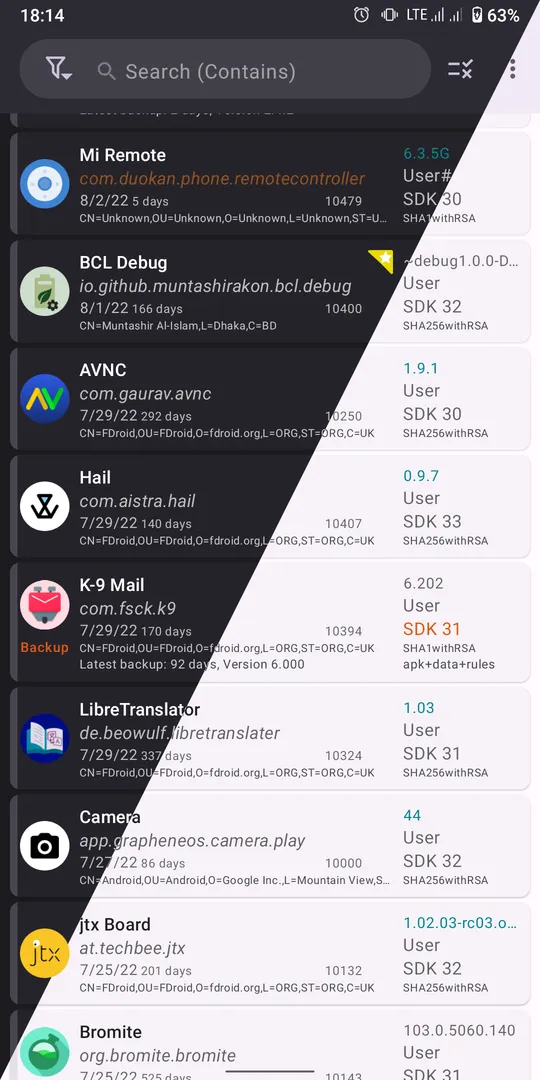



App Manager by Muntashir Al-Islam is a fully featured package manager for Android that shows detailed information about installed apps and lets you install, back up, inspect and control them. It is libre software released under the GPL-3.0-only license, and the build on this page is compiled by F-Droid from the published source code.
App Manager by Muntashir Al-Islam began by merging the features of App_packages Info, ClassyShark3xodus, Activity Launcher and Watt into one app with material design and dark mode. It now adds a debloater, a file manager, a code editor, a logcat viewer, a terminal emulator and more, with extra powers for users who have root or ADB access.
This article explains what App Manager by Muntashir Al-Islam does, walks through its long permission list, shows how to install the APK and covers who will get the most out of it.


What is App Manager by Muntashir Al-Islam?
App Manager by Muntashir Al-Islam is a tool for looking inside and managing the apps on your Android device. On its main page it tries to display as much information as possible. Open any app and you can list its activities, broadcast receivers, services, providers, app ops, permissions, signatures and shared libraries.
The features of App Manager by Muntashir Al-Islam fall into three tiers. General features work on any device. A second group needs root or ADB, such as revoking runtime permissions or freezing apps. A third group needs root, such as blocking app components or backing up apps with their data.
The project describes itself as fully reproducible, copylefted libre software. It uses Material 3 with dynamic colours. The developer is Muntashir Al-Islam, and the app includes an instructions page explaining how to use it.
Key features of App Manager by Muntashir Al-Islam
- Detailed app inspection: List the activities, broadcast receivers, services, providers, app ops, permissions, signatures and shared libraries of any installed app. You can also view or save an app's manifest, which helps when you want to understand what an app declares before trusting it.
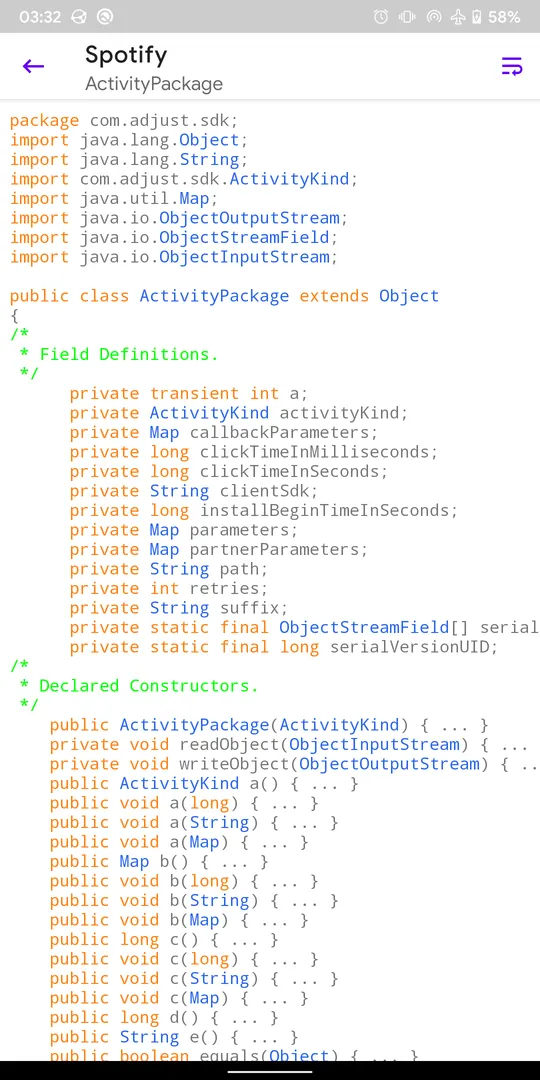
- Tracker and library scanning: App Manager by Muntashir Al-Islam scans apps for trackers and libraries and lists all tracking classes, or only those, along with their code dump. This gives a concrete view of what third-party code is bundled inside an app you have installed or are about to install.
- APK install, share and backup: Install and uninstall APK files, including APKS, APKM and XAPK bundles with OBB files. You can also share APK files, back up and restore APKs, and sign APK files with custom signatures before installing them.
- Activity tools: Launch activities and services directly, create shortcuts to specific activities and intercept activities. These tools come from the app's Activity Launcher roots and help when you want to reach a screen inside an app that its normal menus hide.
- Usage and storage info: Display app usage, mobile and Wi-Fi data usage, and storage info for each app. The description notes this requires the Usage Access permission, which you grant in system settings when the app asks for it.
- Batch operations and profiles: Run batch operations across many apps and single-click operations for common tasks. Profiles let you group settings and actions so you can apply them again later instead of repeating each step by hand.
- Built-in utilities: The app includes a debloater, a code editor, a file manager, a simple terminal emulator and a logcat viewer with manager and exporter. It can also track foreground UI components and open an app in Aurora Store or your preferred F-Droid client.
- Encrypted backups: Backups made with App Manager by Muntashir Al-Islam can be encrypted with OpenPGP via OpenKeychain, RSA, ECC with hybrid AES encryption, or plain AES. This matters when backups hold app data you would not want readable by anyone who finds the file.
- Root and ADB controls: With root or ADB you can revoke runtime and development permissions, change app op modes, kill or force-stop processes, clear app data or cache, view or change net policy, control battery optimization and freeze or unfreeze apps.
- Root-only controls: With root you can block any activity, receiver, service or provider, with Watt and Blocker import support. You can also edit shared preferences, back up apps with data and extras, view system configurations and view or change the SSAID.
App Manager by Muntashir Al-Islam permissions explained
App Manager by Muntashir Al-Islam requests a long list of permissions because it manages other apps. Many are system-level permissions that match the root and ADB features listed in the description. Here is each one:
- Access hidden profiles: Uses the "access hidden profiles" permission, a system-level access related to profiles on the device.
- View network connections: Checks whether the device is online and which network type is used.
- Adjust runtime permissions policy: Uses the "adjust runtime permissions policy" permission, related to managing how other apps' permissions behave.
- Backup: Uses the "backup" permission, which fits the app's backup and restore features.
- Change component enabled state: Uses this permission to enable or disable app components, matching the root-only component blocking feature.
- Change overlay packages: Uses the "change overlay packages" permission.
- Clear app cache: Uses this permission, matching the root/ADB feature to clear app cache.
- Clear app user data: Uses this permission, matching the root/ADB feature to clear app data.
- Delete cache files: Uses the "delete cache files" permission, also related to cache clearing.
- Delete packages: Uses this permission, related to uninstalling apps.
- Device power: Uses the "device power" permission.
- Dump: Uses the "dump" permission to read system state used for detailed app information.
- Enforce update ownership: Uses the "enforce update ownership" permission.
- Force stop packages: Uses this permission, matching the root/ADB force-stop feature.
- Run in the foreground: Keeps a visible notification while it works in the background, for example during long batch operations.
- Background sync service: Syncs or transfers data from a foreground service.
- Special foreground service: Runs a foreground service for a special purpose.
- Get package size: Uses this permission to read app sizes for storage info.
- Get app ops stats: Uses this permission to read app op information.
- Get runtime permissions: Uses this permission to read other apps' permission states.
- Get tasks: Uses the "get tasks" permission to see running tasks.
- Grant runtime permissions: Uses this permission to grant permissions to other apps.
- Install test only package: Uses the "install test only package" permission.
- Install packages: Uses this permission, matching the APK installation feature.
- Interact across users: Uses this permission to work with apps in other user profiles.
- Interact across users full: A broader version of the previous permission.
- Internal delete cache files: Uses the "internal delete cache files" permission.
- Internet access: Connects to the internet.
- Kill uid: Uses the "kill uid" permission, related to stopping running apps.
- Manage app ops modes: Uses this permission, matching the feature to change an app op's mode.
- Manage appops: Uses the "manage appops" permission, also tied to app ops control.
- All files access: Manages all files on the device storage, which fits the file manager and backups. This is sensitive.
- Manage network policy: Uses this permission, matching the view and change net policy feature.
- Manage notification listeners: Uses the "manage notification listeners" permission.
- Manage users: Uses the "manage users" permission.
- Manage sensors: Uses the "manage sensors" permission.
- Network settings: Uses the "network settings" permission.
- App usage data: Reads app usage statistics for the usage display. This is sensitive.
- Show notifications: Shows notifications; Android 13 and newer ask first.
- See installed apps: Lists the apps installed on the device, the core of the app list. This is sensitive.
- Read storage: Reads files in shared storage. This is sensitive.
- Read logs: Uses the "read logs" permission, which fits the logcat viewer.
- Read phone status: Reads phone status, such as whether a call is active. This is sensitive.
- Real get tasks: Uses the "real get tasks" permission.
- Run at startup: Starts itself after the device boots.
- Uninstall apps: Asks to remove app packages.
- Install apps: Asks to install app packages, for example its own updates or APKs you open. This is sensitive.
- Revoke runtime permissions: Uses this permission, matching the root/ADB feature to revoke permissions.
- Start any activity: Uses this permission, which fits launching activities.
- Suspend apps: Uses the "suspend apps" permission.
- Draw over other apps: Shows windows on top of other apps, which fits tracking foreground UI components. This is sensitive.
- Update app ops stats: Uses the "update app ops stats" permission.
- Update domain verification user selection: Uses this permission, related to how apps open links.
- Update itself: Installs its own updates without asking each time.
- Prevent sleep: Keeps the device awake while a task runs.
- Write storage: Saves and modifies files in shared storage. This is sensitive.
- Write secure settings: Uses the "write secure settings" permission.
- Biometrics: Uses fingerprint or face unlock to confirm actions.
- Fingerprint: Uses the fingerprint sensor to confirm actions.
On modern Android, sensitive permissions are requested at runtime, and some, such as Usage Access and all files access, are switched on in system settings. Many of the system-level entries above only take effect when App Manager by Muntashir Al-Islam runs with root or ADB, which is why the matching features are labeled root or ADB only.

How to download and install App Manager by Muntashir Al-Islam APK
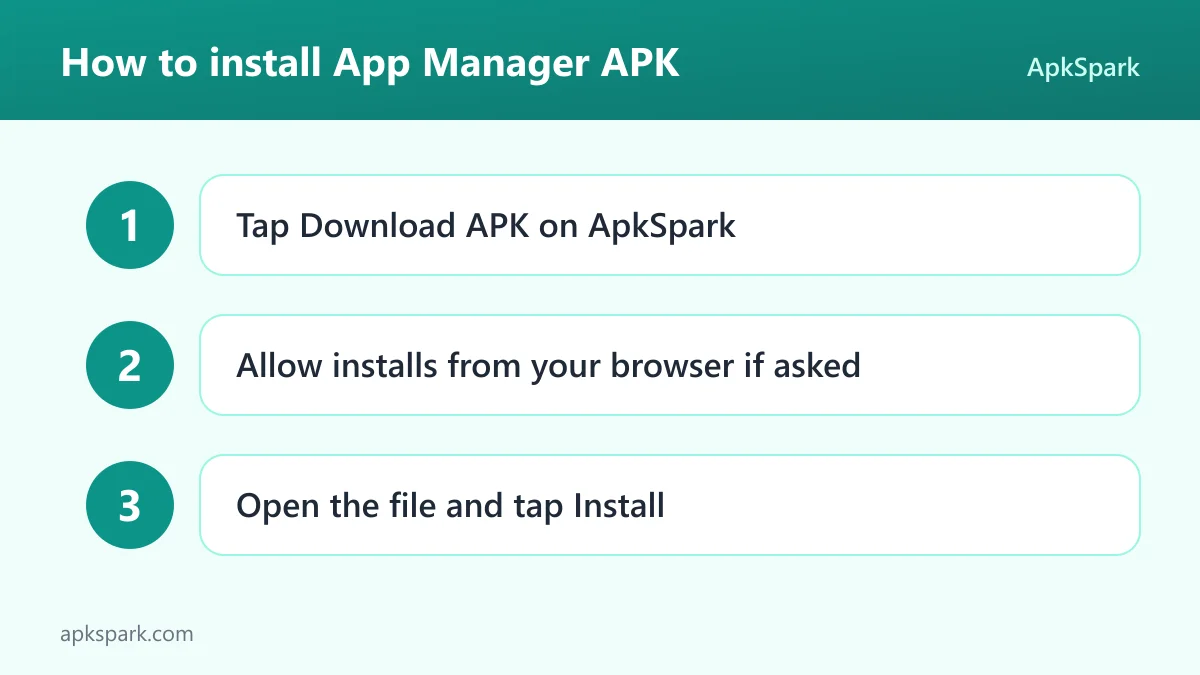
- Tap the Download button on this page.
- Allow installs from your browser when Android asks.
- Open the downloaded file.
- Tap Install.
- Open the app.
If you need help with any of these steps, our guide to installing APK files explains the "install unknown apps" setting and common installer errors. Once App Manager by Muntashir Al-Islam is installed, it can itself install APK, APKS, APKM and XAPK files, so it may also become your tool for future sideloading.
Is App Manager by Muntashir Al-Islam safe?
App Manager by Muntashir Al-Islam is released under the GPL-3.0-only license and describes itself as fully reproducible, copylefted libre software. The source code is public on GitHub, and bugs are tracked on the project's issue tracker.
The APK here comes from F-Droid. According to the repository note, F-Droid builds this APK from the published source code and signs it with the F-Droid key, and the file is downloaded from the official f-droid.org repository. See the F-Droid listing for its entry.
F-Droid lists no anti-features for App Manager by Muntashir Al-Islam. The real safety question is about what you do with it. Root and ADB features can freeze apps, clear data and block components. Used carelessly, they can break apps or system functions, so read the in-app instructions first.
App Manager by Muntashir Al-Islam system requirements
- Minimum Android version: Android 5.0.
- Download size: 28.1 MB.
- Supported ABIs: arm64-v8a, armeabi-v7a, x86 and x86_64.
- Version: 4.1.1.
- Release date: September 7, 2026.
General features of App Manager by Muntashir Al-Islam work without special access. Root/ADB-only features need either a rooted device or an ADB connection, and root-only features need root. Usage and storage info requires the Usage Access permission. RAM requirements are not documented.
A typical session with App Manager by Muntashir Al-Islam
Say you have just installed a new app and want to know what it contains. Open App Manager by Muntashir Al-Islam, find the app in the list and tap it. The details page shows its permissions, components and signatures. Run the tracker scan to see whether it bundles tracking libraries, and view its manifest if you want the full declaration.
If you decide you want a copy of the app before an update, use the backup feature in App Manager by Muntashir Al-Islam to save its APK. Without root, that covers the APK; with root, backups can include data, rules and extras such as permissions and SSAID.
Documented limitations of App Manager by Muntashir Al-Islam
The description is upfront about which features need extra access, and it helps to know the limits before installing:
- Root and ADB gates: Revoking permissions, changing app op modes, killing processes, clearing app data or cache, changing net policy, controlling battery optimization and freezing apps all need root or ADB. Without either, App Manager by Muntashir Al-Islam cannot do them.
- Root-only tools: Blocking components, editing shared preferences, full app backups with data, viewing system configurations and changing SSAID require root. ADB alone is not enough for these.
- Usage Access needed: App usage, data usage and storage info only appear after you grant Usage Access.
- Learning curve: With this many tools in one app, newcomers should expect to spend time with the instructions page before using the advanced options.
Who should use App Manager by Muntashir Al-Islam?
App Manager by Muntashir Al-Islam is built for tech-savvy users. The description says it combines the features of five or six apps that such a person needs. If you regularly check what apps contain, sideload APK bundles or manage many apps at once, it puts those tasks in one place.
Users with root or ADB access gain the most. Freezing apps, revoking permissions, blocking components and full data backups are only available with that access. Without it, you still get inspection, tracker scanning, APK handling and the built-in utilities.
Privacy-minded users may value the tracker scanner. Seeing which tracking classes an app ships, as App Manager by Muntashir Al-Islam reports them, is a concrete way to decide whether to keep it. Casual users who only want to uninstall the odd app may find the interface more than they need.
Tips for getting started with App Manager by Muntashir Al-Islam
- Read the instructions page: The description points to an instructions page inside App Manager by Muntashir Al-Islam that explains how to use the app. Start there.
- Grant Usage Access: Enable it when asked to see app usage, data usage and storage info.
- Scan for trackers: Run the tracker scan on apps you are unsure about to see bundled tracking classes.
- Encrypt your backups: Choose OpenPGP, RSA, ECC or AES encryption when backing up sensitive data.
- Be careful with root tools: Freezing apps or blocking components can break things. Change one app at a time and note what you changed.
- Use profiles for repeat tasks: Save common batch actions in a profile so you can repeat them later.
Alternatives to App Manager by Muntashir Al-Islam
ApkSpark does not list related apps for this one yet. You can browse more Developer Tools apps to compare other tools in this category, or see the Muntashir Al-Islam developer page for other projects.
Final verdict
App Manager by Muntashir Al-Islam packs app inspection, tracker scanning, APK installation and backup, a debloater, a file manager, a logcat viewer and a terminal into one GPL-licensed app. With root or ADB it becomes a deep control panel for every app on the device.
It is built and signed by F-Droid and flagged for no anti-features. If you are comfortable with powerful tools and read the instructions, App Manager by Muntashir Al-Islam is well worth installing.