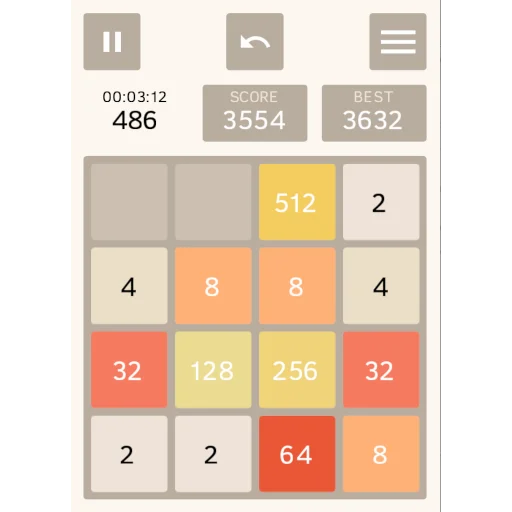


2048 Open Fun Game is a free, open-source version of the classic 2048 sliding-tile puzzle that adds AI players, bookmarks, auto replay and a full game history. It is developed by AndStatus, released under the Apache-2.0 license, and has no ads.
The rules are the ones you may already know. You swipe the board left, right, up or down, matching tiles merge into one tile with double the number, and you aim for the highest tile you can reach. What sets this version apart is everything around the board: unlimited undo and redo, a retries counter, a watch mode that replays your game at any speed, and several AI algorithms you can let play for you.
The build on this page is version 1.16.2, released on 2026-07-21. It is a 1.4 MB download, needs Android 7.0 or newer, and comes from F-Droid, which compiles it from the published source code.

What is 2048 Open Fun Game?
2048 Open Fun Game is a puzzle game based on 2048. The board is a grid of numbered tiles. Each swipe moves every tile as far as it can go in that direction. When two tiles with the same number touch, they merge into one tile with double the value, so 2 and 2 become 4, 4 and 4 become 8, and so on. The developer describes reaching the 2048 tile as "a good first win", but the goal is simply to build the highest number you can.
On top of that classic loop, 2048 Open Fun Game adds tools for reviewing and replaying games. Every recent game is stored with all its moves, bookmarks and scores. You can watch a game forward or backward, stop at any position, and continue playing from there. You can also let an AI take over, change its speed, and compare how different AI algorithms handle the same board.
The project is open source and hosted on GitHub, where the README doubles as its official website. The app is multilingual, and translations are managed through a Crowdin project that anyone can contribute to.
Key features of 2048 Open Fun Game
- Unlimited animated undo and redo: You can step back and forward through your moves as many times as you like. The undo and redo steps are animated, so you can see exactly how the tiles moved instead of having the board jump to a new state.
- Retries counter: Each time you make a move after an undo, whether it is the same move or a different one, the retries count goes up. The counter shows the total retries for the game, which lets you compare results more fairly.
- AI mode with several algorithms: Turn on the AI and it plays for you. You can speed it up or slow it down, stop it and continue yourself, and choose between several AI algorithms to see how they play and compare them.
- Bookmarks: Mark interesting positions during a game. Later you can return to any bookmark and play again from that exact position, which is useful for trying different strategies from the same board.
- Watch mode: Auto replay the current game forward and backward at any speed and stop at any position. From there you can switch to Play mode and continue, which overrides the history from that point on.
- Game history: Recent games are stored with all their moves, bookmarks and scores. You can watch them again or play them from any position or bookmark. Tapping "Try again" or opening a recent game saves the current game to history automatically.
- Move number and game timer: The board shows the move number and game duration. The timer starts when you make a move and stops when you tap Undo or the Pause button, so thinking time during review is not counted.
- Themes and layouts: Choose Device default (on Android 9+), Dark or Light. Portrait uses a near-classic layout, while landscape uses the screen differently and gives you a larger board.
- Share games as files: Export a game as a file so it can be loaded, watched and even played on any other device. This is a simple way to show someone a game or move it to a new phone.
- Multilingual interface: The app is available in multiple languages, and new translations can be added through the project's Crowdin page.

2048 Open Fun Game permissions explained
The F-Droid listing shows no permissions for this build. The app requests no special permissions at all: no internet access, no storage access and no access to contacts, location or the camera.
That fits what the app does. The game, the AI players, the history and the bookmarks all run on your device. Sharing a game as a file is handled through Android's own sharing tools, so the app does not need a permission of its own for it.
On modern Android, sensitive permissions are requested at runtime with a system dialog. Since 2048 Open Fun Game does not request any, you should not see permission prompts while playing.

How to download and install 2048 Open Fun Game APK
- Tap the Download button on this page.
- When Android asks, allow installs from your browser (the setting is usually called "Install unknown apps").
- Open the downloaded file from your notifications or your Downloads folder.
- Tap Install and wait for Android to finish.
- Open the app from your home screen or app drawer.
The file is only 1.4 MB, so it downloads quickly even on a slow connection. If Android blocks the install or shows an error, our guide to installing APK files walks through each setting and the most common problems.

Is 2048 Open Fun Game safe?
2048 Open Fun Game is released under the Apache-2.0 license, a permissive open-source license. The full source code is public on GitHub, so anyone can check how the game works, build it themselves or report problems through the issue tracker.
The APK offered here is the F-Droid build. F-Droid builds this APK from the published source code and signs it with the F-Droid key. The file is downloaded from the official f-droid.org repository. You can see the same package on the 2048 Open Fun Game F-Droid listing.
F-Droid lists no anti-features for this app, so it does not flag ads, tracking or reliance on non-free services. The developer also states that the game has no ads. Combined with the empty permission list, there is very little the app can do beyond running the puzzle on your device.
One thing to keep in mind is the signing key. If you installed the game from a different source signed with another key, Android will not let this APK update it. You would need to uninstall the old copy first, which removes its saved history, so share any games you want to keep as files before switching.
2048 Open Fun Game system requirements
- Minimum Android version: Android 7.0
- Download size: 1.4 MB
- Supported ABIs: arm64-v8a, armeabi-v7a, x86 and x86_64
- Version: 1.16.2
- Release date: 2026-07-21
The four supported ABIs cover nearly all current phones and tablets, plus x86 devices. RAM and storage needs beyond the download size are not documented. The Device default theme option needs Android 9 or newer; on Android 7 and 8 you can still pick Dark or Light.
Managing saved games in 2048 Open Fun Game
The game menu in 2048 Open Fun Game gives you three main actions. You can delete the current game from history, restart with "Try again", or open a recent game from a list. Each of these keeps your history tidy without losing work by accident.
Saving is automatic. When you tap "Try again" or open a recent game, the game you were playing is saved to history first. That means you can review or continue it later instead of losing it the moment you start something new.
Each saved game keeps all its moves, bookmarks and scores. You can watch any of them again or play from any position or bookmark. If you want a game on another device, share it as a file and load it there.
Themes, layouts and languages in 2048 Open Fun Game
2048 Open Fun Game offers three theme choices: Device default, Dark and Light. Device default is available on Android 9 and newer. On those versions, the Dark theme turns on by default when the system-wide Dark theme is enabled in your device settings.
The game also has separate portrait and landscape layouts. Portrait is close to the classic 2048 screen. Landscape uses screen space better and gives you a larger board, which can help on tablets or when the phone sits on a stand.
The interface is multilingual. If your language is missing or incomplete, the developer invites new translations through the project's Crowdin page.
A walkthrough of a typical game
Here is how the documented features of 2048 Open Fun Game fit together in practice. You open the app and start swiping. The move counter ticks up, and the timer starts with your first move.
Say you reach an interesting board where a big merge is close. You add a bookmark. A few moves later you make a mistake, so you tap Undo, watch the tiles slide back, and try a different swipe. The retries counter goes up by one, which records that this result used a retry.
Later you get stuck and want to see what a computer would do. You turn on AI mode, pick one of the algorithms and set the speed. After a while you stop the AI and take over again from where it left off.
When the game ends, you tap "Try again". The finished game is saved to history automatically. Later you open it from the recent games list, switch to Watch mode and replay it backward to the bookmark. From there you switch to Play mode and see if you can do better, which overrides the old history from that position.
How 2048 Open Fun Game differs from the original 2048
The developer lists features that are "not present in the original game", and they explain who this version is aimed at. The original 2048 is a single board you play until it fills up. 2048 Open Fun Game keeps those rules but treats each game as something you can study.
Undo and redo are unlimited, so mistakes are not final. The retries counter keeps that honest by recording how often you went back. Bookmarks and Watch mode let you revisit key moments, and the history keeps recent games so they are not lost when you start a new one.
The AI mode is the other major addition. Several AI algorithms are built in, and you can run them at different speeds and compare them. That turns 2048 Open Fun Game into a way to learn strategy by watching, not only by playing.
Who should use 2048 Open Fun Game?
2048 Open Fun Game suits anyone who likes 2048 but wants more control over a game. If you have ever lost a long run to one bad swipe, unlimited undo and the retries counter let you recover while still keeping track of how many second chances you used. Bookmarks and Watch mode are useful for players who like to analyze where a game went right or wrong.
2048 Open Fun Game also fits people who are curious about how computers solve puzzles. The AI mode lets you watch several algorithms play, adjust their speed, and compare their results on the same kind of board. You can stop the AI at any point and continue by hand.
Finally, it is a good choice for anyone who wants a small, ad-free puzzle game with no permissions. At 1.4 MB with no internet access requested, 2048 Open Fun Game works offline and stays out of the way of your data.
Tips for getting started with 2048 Open Fun Game
- Bookmark before risky moves: In 2048 Open Fun Game, when the board gets tight, add a bookmark first. If the next few swipes go badly, you can return to that position and try another line instead of starting over.
- Watch the AI play: Turn on AI mode, lower its speed and watch how it chooses moves. Then switch between the algorithms 2048 Open Fun Game includes to compare them. You can stop the AI at any moment and continue the game yourself.
- Use the retries counter to compare runs: If you want a fair comparison between games, check how many retries each one used. A high score with zero retries means something different from the same score reached with many undos.
- Try landscape on a tablet or large phone: The landscape layout uses screen space differently and gives you a larger board. Rotate your device to see whether it suits you better than the classic portrait view, and switch back at any time.
- Review games in Watch mode: Open a finished game from history and replay it backward at your own speed. Stop at the point where things went wrong, switch to Play mode and see if a different move works better.
- Share a game as a file: Before you change phones or reinstall, share any games you want to keep as files. They can be loaded, watched and played on another device.
Alternatives to 2048 Open Fun Game
ApkSpark does not list related apps for this title yet. You can browse more Puzzle games to compare other options in the same category, or visit the AndStatus developer page to see other apps from the same developer.
When comparing puzzle games, it is worth checking the license, the permission list and whether F-Droid reports any anti-features. Each app page on this site lists those details in the same format as this one.
Final verdict
2048 Open Fun Game keeps the simple rules of 2048 and adds tools that make each game easier to review and replay: unlimited undo and redo, bookmarks, Watch mode, a saved history and several AI players. It is open source under Apache-2.0, has no ads, requests no permissions and needs only 1.4 MB.
If you want a version of 2048 that respects your device and lets you experiment with strategy, undo freely and study replays, this is an easy one to install and try for a few games. The only real requirement is Android 7.0 or newer.